Category: Pastor Wellness
Date Posted : 20-Sep-2026
Church booking software with AI answers scheduling requests the moment they arrive — a room reservation, a meeting with the pastor, a volunteer shift — without a staff member playing calendar tennis. The hours at stake are documented: the median full-time senior pastor works 55 hours a week , per Lifeway Research, with meetings and electronic correspondence driving the load higher — over 70% of pastors spend up to five hours weekly in meetings alone. This guide covers how AI booking systems for churches work, what they handle, and the math on what they return.
What Is Church Booking Software?
Church booking software manages reservations and appointments across a church’s shared resources — rooms, facilities, staff time, equipment, and event slots. Traditional versions are self-service calendars. AI-powered versions add a conversational layer: members and guests request in plain language, by phone or chat, and the system checks availability, applies your rules, and confirms.
The difference shows up at the edges. A calendar link works for the tech-comfortable member booking a Tuesday meeting. An AI booking system for churches also serves the 78-year-old caller who will never click a link, the bride’s mother calling about the fellowship hall, and the guest who phones at 9pm.
Why Do Churches Need an Automated Church Scheduler?
Churches need an automated church scheduler because scheduling is the quiet tax on ministry time. Lifeway’s workload research found electronic correspondence consumes two to six hours weekly for half of pastors — and much of that traffic is coordination: who has the youth room, when can the pastor meet, which Saturday is free for the shower.
The coordination cost compounds in three ways:

Double-bookings and conflicts erode trust — nothing sours a volunteer faster than arriving to a room already in use.
Back-and-forth messages turn a 30-second decision into a three-day email thread.
After-hours requests wait for Monday, and some requesters simply give up.
An automated church scheduler collapses each thread into one interaction, applying the rules a staff member would — buffer times, approval requirements, setup windows — without the staff member.
How Does an AI Booking System for Churches Work?
An AI booking system for churches works in five steps:
Resource and rules setup. Rooms, staff calendars, and equipment are loaded once, with rules: capacity, approval chains, setup/teardown buffers, blackout dates.
Requests arrive in natural language. By phone, web chat, or form — “Can we get the gym for a lock-in on the 14th?”
The AI checks and resolves. Availability, conflicts, and rules are applied instantly; alternatives are offered when the first ask fails.
Confirmation and calendar sync. The booking lands on the master calendar, with confirmations to the requester and notifications to the right staff.
Reminders and follow-through. Automated reminders cut no-shows; summaries give staff a daily picture.
Missional Agents’ MIRA handles booking requests as part of its 250+ call scenarios: on a live call it captures booking details or schedules a staff callback, so the phone becomes a booking channel instead of a message pile.
What Can an AI Scheduling Assistant Handle?
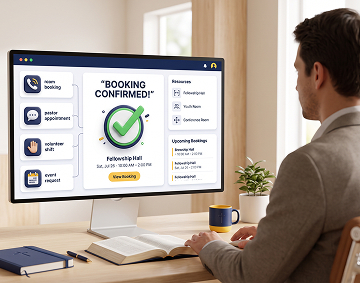
An AI scheduling assistant can handle the recurring, rule-based majority of church scheduling. From our production experience across 20,000+ deployed call minutes, the common categories:
| Scheduling category | Example request | What the AI does |
|---|---|---|
| Room and facility bookings | “Is the fellowship hall free Saturday?” | Checks availability, applies rules, books or offers alternatives |
| Pastoral appointments | “I’d like to meet with Pastor Mike.” | Offers open slots on the pastor’s booking calendar |
| Event questions and sign-ups | “How do I register for VBS?” | Answers from the events knowledge base, captures registration details |
| Volunteer shifts | “I can serve second Sundays.” | Records availability and routes to the ministry coordinator |
| Recurring ministry meetings | “Our small group needs Room 12 weekly.” | Creates the series with conflict checks on every occurrence |
| Facility tours and visits | “Can I see the venue for a wedding?” | Schedules the tour with the facilities contact |
Choosing an Online Church Reservation System
Choosing an online church reservation system comes down to six evaluation criteria:
Multiple front doors: phone and chat, not just a web form — the phone still carries the highest-intent requests.
Rules engine: approvals, buffers, and permissions that match how your church actually governs its spaces.
Calendar integration: one master calendar, synced, no parallel spreadsheets.
Multisite support: campus-specific resources under one system.
Human escalation: a defined path for sensitive or complex requests.
Transparent pricing: flat monthly cost you can budget, not per-booking fees.
Church Volunteer Scheduling Software That Actually Works
Church volunteer scheduling software works when it removes friction for the volunteer, not just the coordinator. Volunteers quit systems that demand app downloads and logins for a monthly commitment; they stay with systems that let them confirm by a phone call or a single tap.
An AI church assistant flips the model: instead of coordinators chasing sign-ups, the assistant captures availability whenever volunteers call, sends reminders before shifts, and flags gaps to the coordinator early — while the human relationship of asking, thanking, and shepherding volunteers stays with people.
Event Booking Software for Churches vs. Generic Tools
Event booking software for churches beats generic schedulers when church-specific rules matter. The honest comparison:
| Capability | Generic scheduler (e.g., calendar links) | Church-aware AI booking |
|---|---|---|
| Self-service link booking | Excellent | Excellent |
| Phone-based requests | Not supported | Handled conversationally, 24/7 |
| Ministry rules (approvals, buffers, sacred-space policies) | Manual workarounds | Built into the rules engine |
| Multisite resources | Separate accounts | Pooled under one system |
| Prayer/pastoral sensitivity routing | None | Escalation paths built in |
| Cost model | Per-user subscriptions | Flat monthly plan |
Generic tools are fine for staff-to-staff meetings. The moment the congregation and community are the requesters, church-aware handling earns its keep.
How Church Calendar Automation Saves Staff Hours
Church calendar automation saves hours you can actually count. Run the math on a typical mid-size church:
25 scheduling interactions weekly × 15 minutes of staff handling each = ~6.25 staff hours per week.
6.25 hours × 50 weeks = 312 staff hours a year — nearly eight full work-weeks.
At a $22/hour administrative loaded cost, that is ~$6,900 a year in coordination labor, before counting the pastor’s own hours or the cost of double-booking mistakes.
Against a flat software cost — Missional Agents plans start at $249/month with booking handled inside the Church AI receptionist — the payback question is simply whether your coordination volume is real. For most churches over 100 in attendance, it is. Start the 14-day free trial and measure your own volume. (CTA 1)
FAQs: Smart Scheduling for Churches
What is the best appointment scheduler for churches?
The best appointment scheduler for churches combines self-service booking links for the tech-comfortable with conversational phone handling for everyone else, under one master calendar with church-specific rules. Evaluate against the six criteria above; insist on a free trial with your real calendar before committing.
How is smart scheduling for churches different from a shared calendar?
A shared calendar displays availability; smart scheduling for churches acts on it. The AI takes requests in natural language, enforces your rules, resolves conflicts, offers alternatives, confirms, and reminds — the work a staff member would otherwise do between the calendar and the requester.
Can an AI church assistant handle wedding and funeral scheduling?
Yes, with escalation. An AI church assistant can capture the request, check facility availability, and gather details — then route to a pastor for the human conversation. Funerals especially should always reach a person quickly; a well-configured system treats them as priority escalations, not routine bookings.
What does church calendar automation cost?
Standalone booking tools run from free tiers to per-user subscriptions that grow with staff size. Conversational AI systems that include booking, like Missional Agents’ MIRA, run flat: $249/month standard and $699/month for larger and multisite churches, with pooled minutes and a 14-day free trial.
Does an automated church scheduler work for multisite churches?
Yes — multisite is the strongest case. Campus-specific rooms, staff, and rules live under one system; one phone line or chat serves every location with campus-aware answers; and central staff see one consolidated calendar instead of per-campus silos.
Book Every Room, Free Every Hour
Scheduling is solvable. The 312 annual hours your team spends on calendar tennis can be returned to ministry with church booking software that answers like a person and enforces rules like your best administrator.
Missional Agents builds digital support staff for churches — MIRA answers booking calls today as part of 250+ ministry scenarios, alongside everything else on your line. See how it fits your operations at AI for churches, explore the broader picture in our guide to AI for church management, and start your 14-day free trial today. (CTA 2)
Related reading: how AI is transforming sermon preparation and serving as an AI tool for church outreach